More than a name on a list.
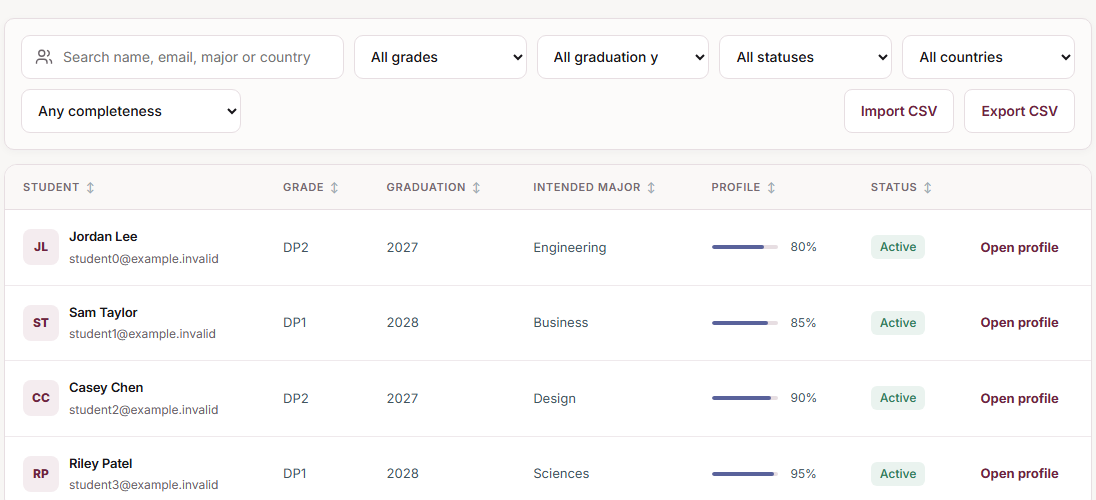

Pathlyra / For IB & international schools
Help students plan their next step. Give teachers and counsellors a clear view of the work ahead.
Track applications, coordinate document requests and follow up on deadlines.
More than a name on a list.
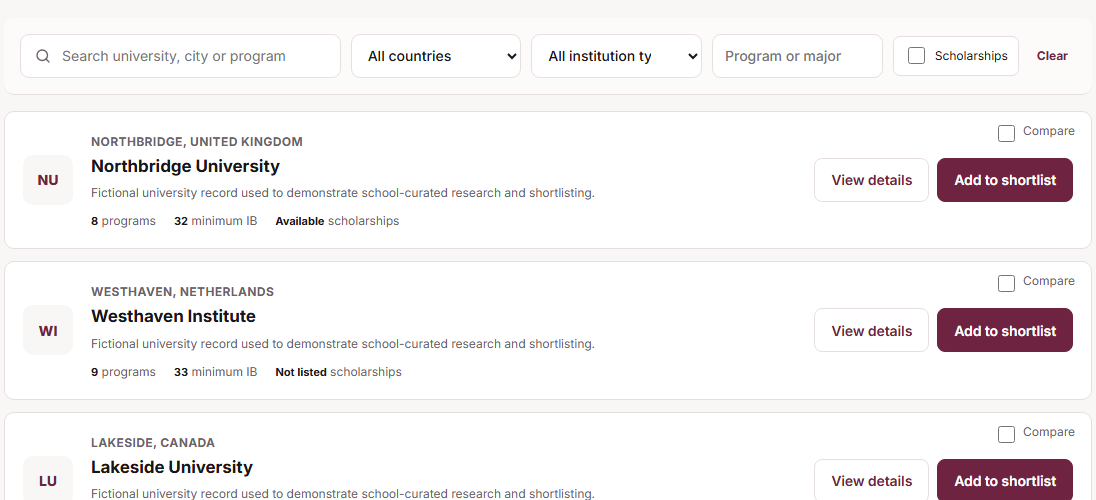
A shortlist with a sense of direction.
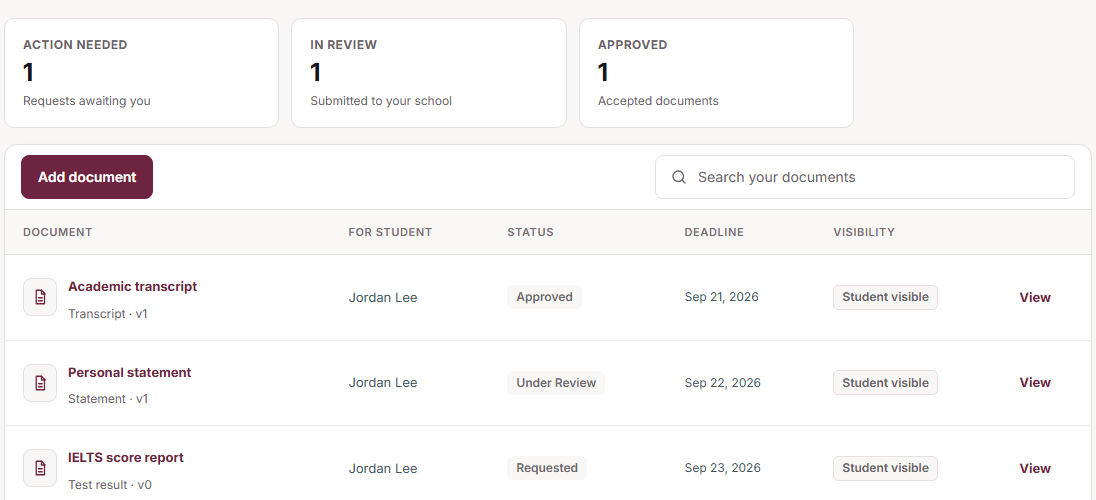
Every document. Every follow-through.
Product interface shown with fictional demonstration data.
01 / A shared perspective
Choose a role. See their workspace.
See student progress. Keep the right work moving.
Explore your options. Know what to do next.
Manage your assigned requests and recommendations.
From application to follow-up
Follow Maya's application through four everyday steps.
Student workspace
A university, an application stage and a deadline give the school a shared starting point.
Counsellor workspace
The counsellor assigns a recommendation request with a due date so the teacher knows what is needed.
Teacher workspace
The teacher opens the assigned request and uploads a response for review. Recommendation letters remain restricted from student access.
Counsellor workspace
Review submitted documents and check approaching application deadlines. The school coordinates the next action.
Illustrative walkthrough with fictional people, university and dates. Pathlyra tracks applications; it does not submit them to universities.
02 / The work behind the possibilities
Keep the conversation moving, from the first meeting to the next deadline.
Academics, interests and achievements.
The context for better conversations.
Give university research a direction.
Build a shortlist worth discussing.
Documents, deadlines and follow-ups.
Everyone knows what comes next.
03 / Your guidance toolkit
Explore what connects your school’s guidance programme.
IB subjects, HL/SL levels, grades and external test records.
Research, shortlists and career orientation. Assessments support guidance—not aptitude diagnosis.
Track application stages, funding opportunities and deadlines.
Requests, reviews, recommendations and staff transcript templates.
Appointments, meeting notes, assigned actions and follow-ups.
Activities, CVs, events, video courses and school resources.
Getting your school started
Discuss your school's needs first, then agree the setup and support before inviting users.
Choose the school administrator, year groups and first workflows to use.
The school administrator creates accounts or imports student and teacher rosters using the available CSV tools.
Assign teachers to subjects. Agree any staff training and practise the workflow with sample records.
Check access with a small group, then share login details with the remaining staff and students.
Timing and support: Setup depends on roster readiness and school configuration. Confirm the expected schedule, training support and available demo language in your enquiry.
Discuss your school setupThe next chapter is yours
Your school. Your team. A walkthrough around what matters to you.
IB and international schools coordinating university and career guidance. Students, counsellors and teachers each have a role-specific workspace.
No. Pathlyra connects university planning and counselling alongside your existing school systems.
Book a walkthrough to discuss your school’s needs, setup and pricing. Schools are onboarded directly; there is no automatic online subscription.
Your school counsellor or administrator creates student and teacher accounts. Existing users sign in through School login.